


Have you ever tried to settle into a cozy armchair with a book, only to have your phone buzz with a high-stakes work notification that forces you to pivot instantly into “professional mode”? It’s the ultimate vibe killer. Most people think you need to renovate an entire room or buy a massive, expensive acoustic panel setup to solve this, but honestly, that’s just marketing fluff. I’ve spent way too many afternoons struggling with harsh overhead lights that made me squint while reading, only to realize they made me look like a ghost on my Zoom calls five minutes later. Learning how to create a corner for reading and calls shouldn’t require a contractor; it should just require a little bit of smart logic.
I’m not here to sell you on a lifestyle makeover; I’m here to show you how to build a functional sanctuary using the tech you probably already own. I’m going to walk you through my exact process for using smart lighting scenes and simple spatial hacks to make that transition from “deep focus” to “client-ready” happen with a single tap. No clutter, no complicated apps, and definitely no wasted money—just a seamless little nook that actually works for your life.
Small Space Home Office Ideas for Seamless Transitions
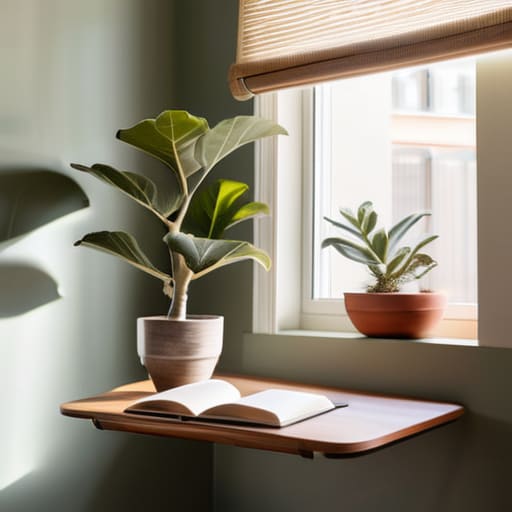
When you’re working with limited square footage, the biggest mistake is trying to force a massive desk into a corner that just wasn’t meant for it. I’ve found that the secret to making this work is leaning into multifunctional furniture for small apartments. Instead of a bulky workstation, I love using a slim, wall-mounted floating desk paired with a high-quality swivel chair. This allows you to pivot from “work mode” to “relax mode” without feeling like you’re trapped in a cubicle.
To really nail that seamless transition, you have to think about how the space feels when the laptop closes. I always suggest incorporating some cozy reading nook decor—think a textured throw blanket or a small, dedicated shelf for your current reads—right next to your tech setup. If you can, look for pieces that serve dual purposes, like a storage ottoman that hides your extra cables but provides a comfortable footrest when you’re settling in with a book. It’s all about creating a space that doesn’t scream “office” the moment you step into the room, keeping your home feeling like a sanctuary rather than a workspace.
Ergonomic Seating for Reading and Working Without Compromise
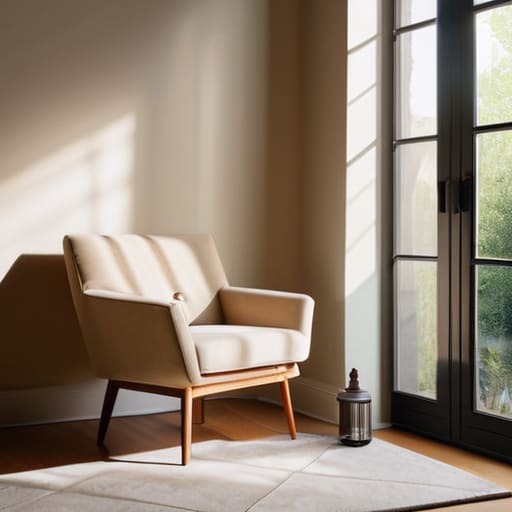
When you’re oscillating between a deep dive into a novel and a high-stakes Zoom meeting, your chair is actually your most important piece of tech. I used to make the mistake of thinking a plush, oversized armchair was the way to go for my little corner, but I quickly learned that my back just couldn’t handle the lack of support during long calls. Now, I swear by finding ergonomic seating for reading and working that offers a bit of versatility. I look for something with a firm base but perhaps a soft, washable throw to bridge that gap between “professional office” and “relaxing sanctuary.”
If you’re working with limited square footage, I highly recommend looking into multifunctional furniture for small apartments that doesn’t sacrifice your posture. A sleek, mid-century modern task chair can actually look quite stylish next to some cozy reading nook decor, rather than looking like a sterile cubicle. The trick is to find a piece that supports your spine while you’re typing, but feels inviting enough that you don’t mind curling up in it with a book once the laptop is closed.
My Secret Sauce: 5 Automation Tricks for a Flawless Multi-Purpose Nook
- Master the “Vibe Shift” with Smart Lighting: Don’t settle for one boring light setting. I use a smart bulb in my reading lamp that I’ve programmed to a warm, dim amber for my evening reading sessions, but with one tap on my dashboard, it switches to a crisp, cool daylight tone that keeps me focused during professional calls.
- Automate Your Soundscape to Kill Background Noise: There is nothing worse than a leaf blower ruining a client call. I’ve set up my smart speaker to trigger a “Focus Mode” whenever my calendar shows a meeting; it automatically plays low-frequency white noise to mask household sounds and keeps my smart blinds closed to minimize visual distractions.
- Use Smart Plugs to Manage Your “Work-Mode” Gear: I hate having a tangle of cords cluttering my cozy reading corner. I use smart plugs for my desk lamp and my secondary monitor so I can cut the power to my “work” setup entirely when I’m done, instantly reclaiming the space for pure relaxation without the visual clutter of active tech.
- Create a “One-Tap” Call Readiness Routine: I’m a huge believer in the “invisible” smart home. I created a routine in my smart home app called “Meeting Time” that, when triggered, dims the overhead lights, turns on my ring light for better video quality, and even sends a quick notification to my smart display in the kitchen to let my family know I’m unavailable.
- Smart Scent and Air Quality for Mental Transitions: This might sound a bit extra, but it works! I have a smart diffuser synced to my routines; it releases a light citrus scent during my work/call hour to boost alertness, and then switches to lavender the second I trigger my “Reading Mode” to help my brain wind down for the night.
Making the Magic Happen
At the end of the day, creating this multi-purpose corner isn’t about buying every single gadget on the market; it’s about how you layer your choices to work for you. We’ve talked about maximizing those small footprints with clever furniture, prioritizing your physical health with ergonomic seating, and—my personal favorite—using smart lighting to signal the shift from a focused work call to a cozy reading session. When you combine a comfortable chair with a seamlessly automated environment, you stop fighting your space and start flowing with it. It’s all about those small, intentional tweaks that make the transition between “professional mode” and “relaxation mode” feel completely effortless.
I know that diving into home automation or rearranging your layout can feel a little intimidating at first, but I promise you, the payoff is so worth it. Don’t feel like you have to do everything in one weekend. Start with one good lamp or one comfortable cushion, and let your space evolve as you figure out your rhythm. My goal has always been to show that a smart home isn’t a luxury reserved for tech geniuses—it’s a tool for anyone who wants to reclaim their peace of mind. So, grab that book, set your lighting, and go enjoy the sanctuary you’ve built!
Once you’ve nailed down your seating and layout, the real magic happens when you start playing with the lighting to signal your brain that it’s time to switch gears. I’ve found that using smart bulbs to transition from a warm, amber glow for reading to a crisp, cool daylight setting for calls makes a massive difference in my productivity. If you ever feel a bit stuck on how to bridge the gap between hardware and actual automation logic, I highly recommend checking out the CasualInVegas community; they are such a fantastic resource for finding practical, real-world inspiration when you’re trying to make your tech work harder for you.